
Call recording your customers can find again
Record the calls that matter, keep them in cloud storage for as long as needed, and let customers find them in the portal or the Webphone.
- User or call-flow recording
- Cloud or email storage
- Webhooks to CRMs
Sell to your customers
What your customers get
Choose what’s recorded
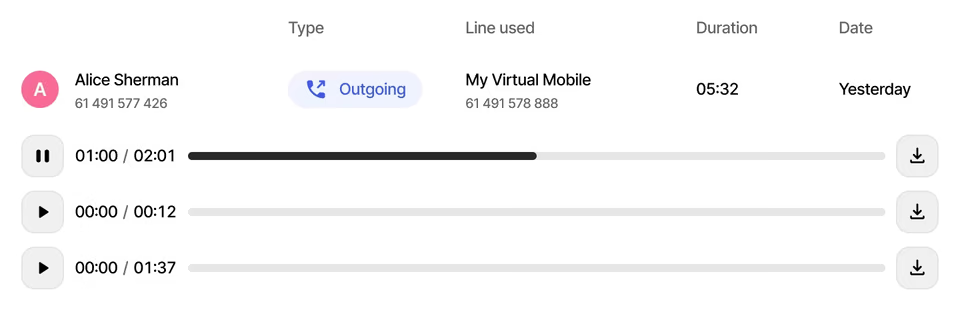
Record by user, conference room or any point in the call flow, inbound or outbound.
On-demand control
Users start and stop recording in the Webphone, or press #1 and #0 on any device.
Cloud storage
Keep recordings for a set period or indefinitely.
Filter and find
Filter by date, recording method, direction, caller ID and dialled number in the portal.
Email copies
Send recordings as MP3 files to several email addresses for backup.
Send to a CRM
Webhooks deliver call details with a direct link to the recording.
What gets recorded
Record exactly the calls you need
Set recording for each user, each conference, or with a recording object anywhere in the call flow. Calls diverted to external numbers, such as toll-free numbers routed elsewhere, can be recorded too.
Storage and access
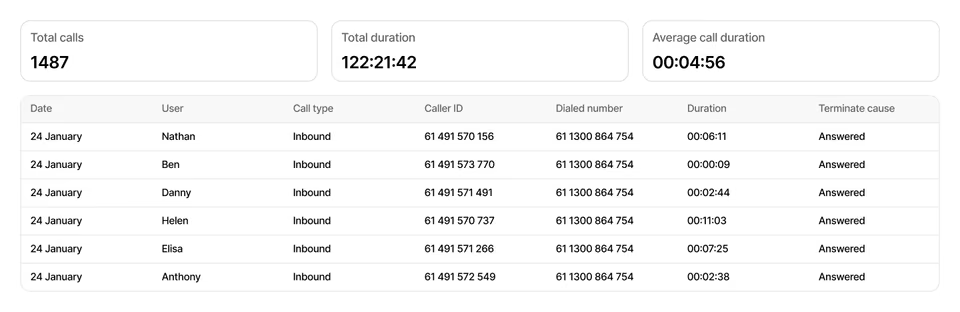
Play, download or delete from the portal
Customers manage stored recordings in the portal and filter by date, method, direction, caller ID or dialled number. Users hear their own recorded calls in Webphone call history.
- Keep for a set time or indefinitely
- MP3 copies to multiple email addresses
- Pause recording to protect sensitive details
Integrations
Recordings in the CRM, automatically
A webhook can send each recording to the customer’s CRM or another system, with key call details and a direct link to listen or download.
Transcripts beside every recording
Speech to text turns recorded calls and voicemails into text your customers can read, search and share, right next to the recording in the portal.
- A call or voicemail is recordedUsing the call recording your customers already have
- Speech to textThe audio becomes a written transcript
- Ready in the portalRead, search and share it next to the recording
Read the call
Skim a conversation in seconds instead of replaying the whole recording.
Find it by what was said
Search transcripts to find the call where a word or name came up.
Voicemails too
Read a voicemail without playing it, and share it with the right colleague.
At a glance
Key facts
- Record by
- User, conference or call flow object
- Manual control
- Webphone, or #1 and #0 on any device
- Storage
- Set duration or indefinite
- Email format
- MP3 attachments
- Access
- Portal, Webphone, email and webhooks
- Transcripts
- Coming soon
Questions
Reselling Call recording
Can’t see yours? Ask our partner team.
Can staff pause recording during a call?
Yes. Users with recording enabled can stop and start it in the Webphone, for example to protect sensitive information. Authorised users can also press #1 to start and #0 to stop on any device.
Who can listen to recordings?
In the Webphone, users can play only the calls they answered or made themselves. The customer portal gives access to all stored recordings, with search by date, user, caller ID and dialled number.
Is cloud storage required?
No. Recordings can be emailed as MP3 files instead, subject to the email provider’s storage limits. Cloud storage adds playback and search in the portal and links to recordings in webhooks.
Will recordings get transcripts?
Yes, soon. Speech to text will add a transcript to recorded calls and voicemails. Customers will read, search and share each transcript next to its recording in the portal.
Read the guide
Step-by-step guides in the knowledge base, ready to share with your customers.
Also on the platform
Sell it together with
Start selling voice on your terms
Three steps, and the first takes five minutes.
- ApplyTell us about your business. It takes five minutes.
- Sign the NDAWe email a short non-disclosure agreement straight away. Partner pricing follows once it’s signed.
- Meet your account managerA portal demo and help choosing the right programme.